Rewards report
In the Referrals app, it is possible to view a report of the rewards that employees have redeemed. This can help determine the most popular rewards and which rewards employees do not request.
Incentivizing employees to recruit highly qualified applicants is aided by offering rewards that entice employees to earn points. Additionally, it can be helpful for the Referrals app administrator to see what rewards are popular, to ensure a stock of highly sought-after rewards is always available.
Reward analysis
To view the Reward Analysis report, navigate to . This opens the Reward Analysis report in a default stacked () bar chart ().
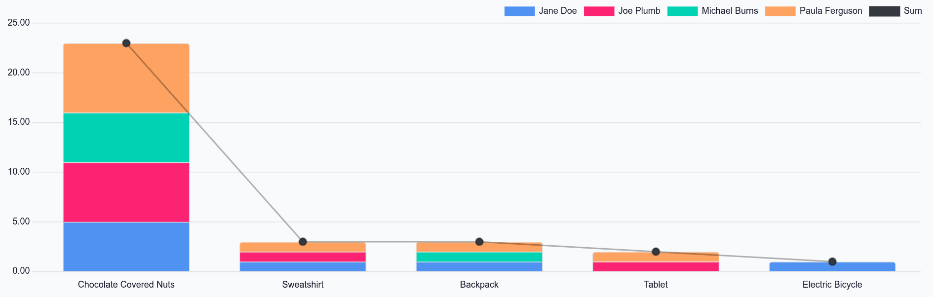
The X-axis is populated with the various rewards, while the Y-axis is populated with the number of rewards redeemed by employees. All employees who have redeemed rewards appear in their own identifying color.
This report shows that Chocolate Covered Nuts are the most desired reward, with 23 distributed to employees. It can also be determined that employees do not often request the Sweatshirt, Backpack, Tablet, and Electric Bicycle; therefore, inventory for those items does not need to be as high as the Chocolate Covered Nuts.